How Knowledge Training Works in 3 Steps
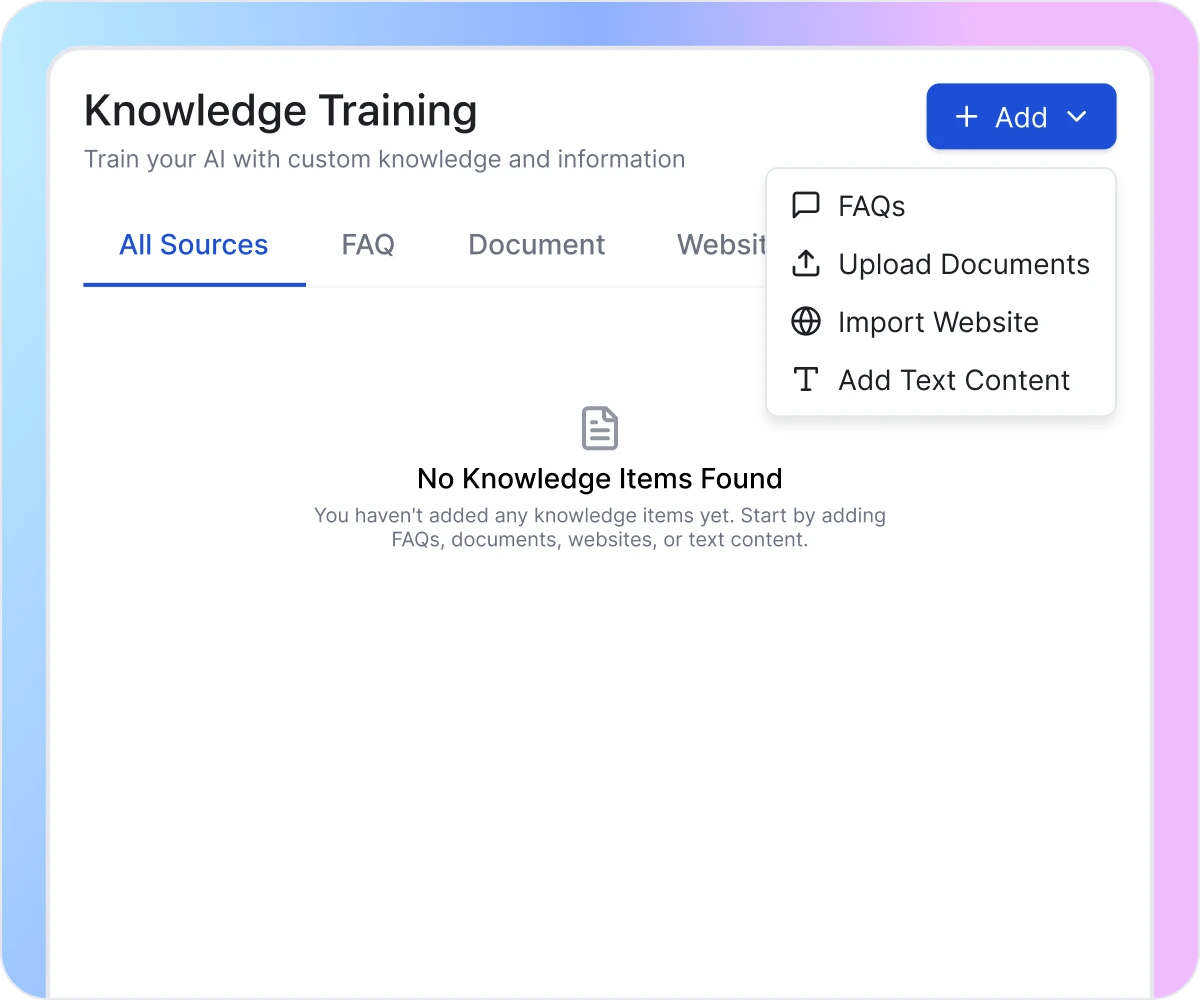
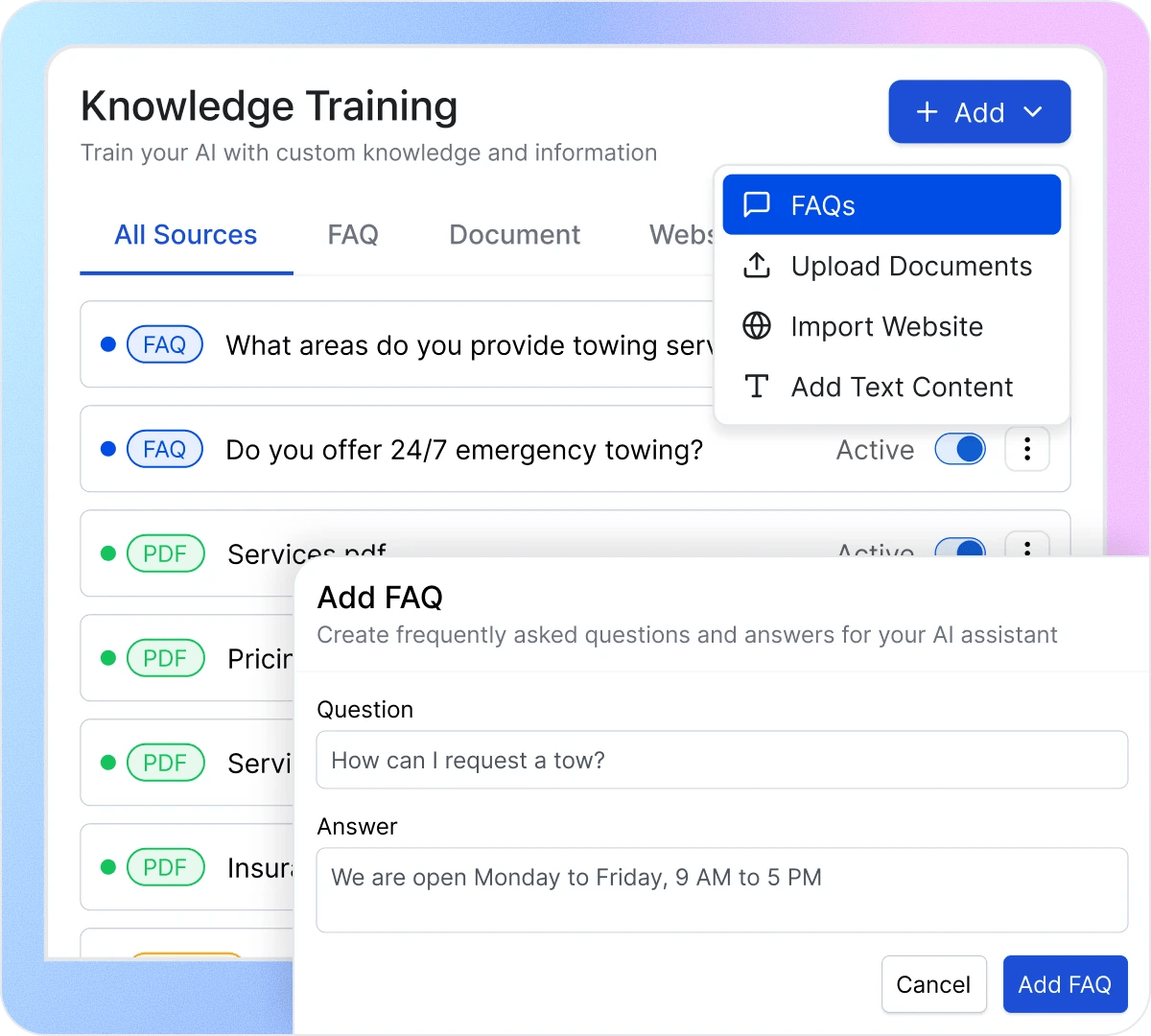
Click the Add button and choose your source type—FAQs, Upload Documents, Import Website, or Add Text Content. Each method lets you add business-specific information that your AI receptionist needs to answer caller questions accurately. Mix and match sources to build comprehensive knowledge coverage.
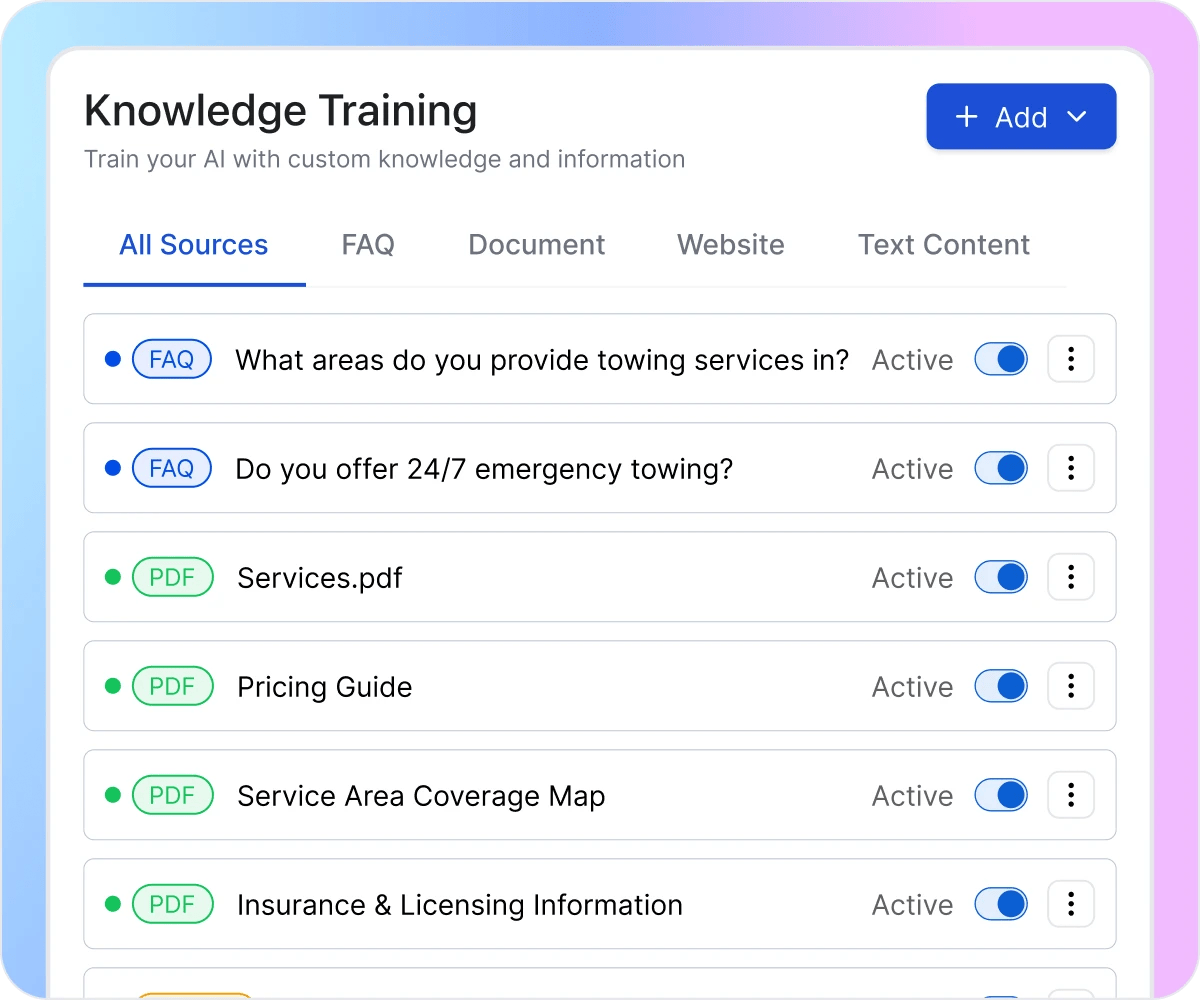
All your sources appear in the Knowledge Base with tabs for All Sources, FAQ, Document, Website, and Text Content. See everything at a glance, check which sources are active, and manage your AI’s knowledge from one central dashboard. Each source shows its type, content preview, and status.
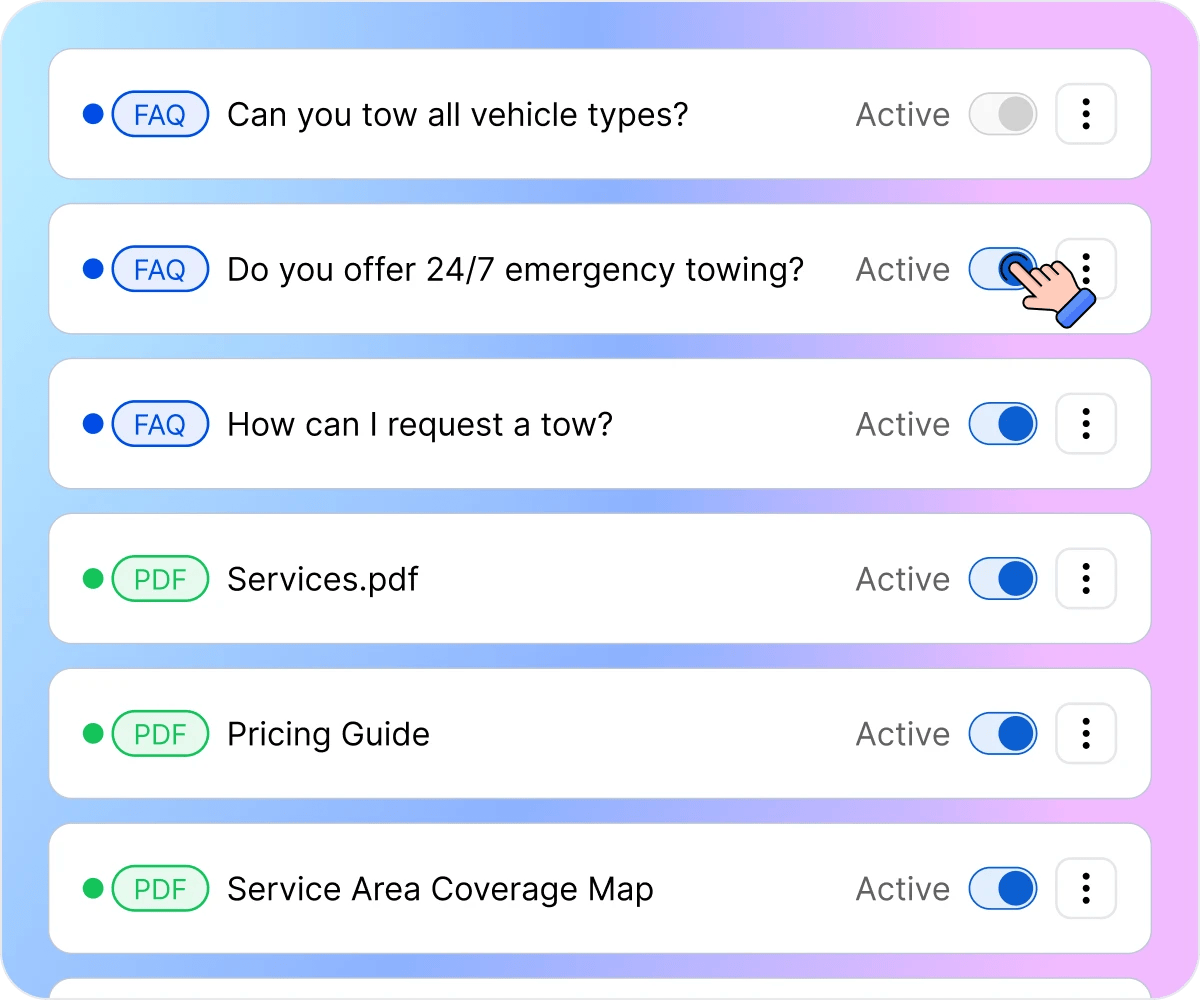
Control what your AI knows with simple Active/Inactive toggles. Testing new information? Keep it inactive until you’re ready. Seasonal services? Activate relevant content when needed. Outdated pricing? Deactivate instantly. Your AI only uses active sources when answering callers.
How Knowledge Training Prevents Incorrect Answers

Stop Losing Callers to Vague Answers
Untrained AI receptionists hit dead ends when callers ask specific questions. “What are your hours?” “Do you offer financing?” “How much does a consultation cost?” Without proper training, your AI deflects or gives unhelpful responses that frustrate callers. Welco’s Knowledge Training gives your AI the answers it needs—so callers get accurate information instead of being told to call back or check your website.

Stop Giving Outdated or Wrong Information
Business details change—prices increase, services expand, hours shift seasonally. AI systems trained once and forgotten give callers yesterday’s information today. Welco lets you update knowledge sources anytime. Change your FAQ answers, upload new documents, and reimport your website after updates. Your AI receptionist stays current because you control exactly what it knows.

End the Gap Between Website and Phone
Your website has detailed service descriptions, pricing pages, and FAQ sections—but callers still ask the same questions because they didn’t read it. Welco’s Import Website feature pulls your existing content directly into your AI’s knowledge base. Everything you’ve already written becomes available to callers instantly, without duplicating effort or maintaining separate information sources.
What Businesses Say About Knowledge Training
“We have 47 different services with different pricing tiers. Training our AI receptionist seemed overwhelming until we just imported our website. Welco pulled in our service pages automatically, and now the AI answers pricing questions accurately. We added a few FAQs for edge cases, and our callers get better information than they did from our human receptionist who couldn’t remember everything.”

Jennifer Martinez
Owner CleanPro Commercial Services
“Our law firm handles very specific case types, and we needed the AI to qualify leads properly. We uploaded our intake criteria as a document and added FAQs about our practice areas. Now the AI asks the right questions and gives accurate information about what we handle. Callers who aren’t a fit get directed appropriately instead of wasting attorney time on consultations we can’t help with.”

Michael Thompson
Office Administrator Thompson & Associates Law
“Seasonal business means our hours, services, and availability change constantly. Before Welco, updating our phone system meant calling our answering service and hoping they noted everything correctly. Now I toggle knowledge sources on and off myself. Summer hours? Activate that source. Holiday closures? Update the FAQ. Winter services? Swap the active content. Total control without waiting on anyone.”

Sarah Chen
Operations Manager ,Lakeside Property Management
Welco Integrates Seamlessly with Your Business Tools
Your trained AI receptionist connects to 8,000+ apps through Zapier—including Google Calendar, Outlook, Cal.com, and Calendly for scheduling. Knowledge Training ensures your AI knows what services are bookable, how long appointments take, and what information to collect. Sync call data to your CRM, trigger follow-up sequences, or update spreadsheets automatically.
Industries That We Serve

Accountants
Clients and prospects ask about tax services, filing deadlines, document requirements, and fee structures. Train your AI with your service offerings, pricing tiers, and common tax questions so callers get informed answers that build trust and move toward consultations.

Plumbers
Homeowners want to know service areas, emergency availability, pricing estimates, and what issues you handle. Train your AI with your service menu, coverage zones, and common job details so callers get accurate information that qualifies them before dispatch.

Real Estate
Buyers and sellers call about listings, market conditions, agent availability, and the buying or selling process. Train your AI with your current listings, service areas, and transaction processes so callers get helpful information that converts inquiries into appointments.

Gyms & Fitness Centers
Prospects ask about membership options, class schedules, facility amenities, and trial offers. Train your AI with your membership tiers, class times, and facility details so callers get complete information that drives sign-ups instead of unanswered questions.

Veterinary Clinics
Pet owners call with questions about services, vaccination schedules, emergency protocols, and appointment availability. Train your AI with your clinic’s services, pet care information, and booking policies so callers get accurate answers without tying up veterinary staff.

Roofing Companies
Property owners need to know about inspection services, repair versus replacement options, insurance claim processes, and scheduling availability. Train your AI with your service offerings, coverage areas, and estimate procedures so callers get accurate information that books qualified appointments.
Your AI Is Only as Good as What It Knows
Stop letting untrained AI give callers wrong answers or unhelpful deflections. Welco’s Knowledge Training puts you in control—add FAQs, upload documents, import your website, and keep your AI receptionist accurate and current.
FAQ About Knowledge Training in Welco
How many knowledge sources can I add in Welco?
The Starter plan ($39/month) includes up to 5 knowledge sources—enough for basic FAQs and a few web pages. Professional ($99/month) allows up to 10 sources for growing businesses. Business ($149/month) and Enterprise plans include unlimited sources for complex operations with extensive documentation.
