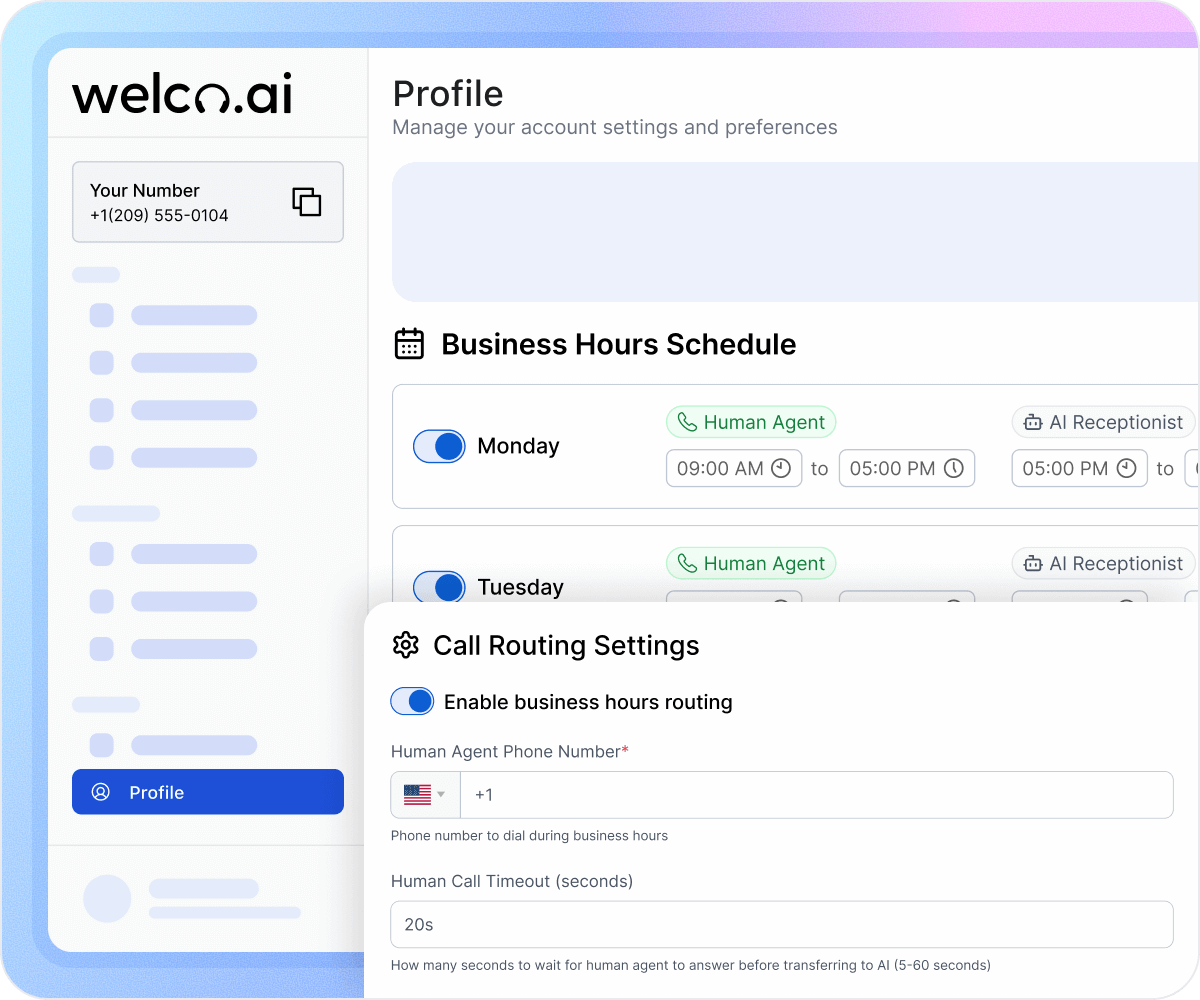
How after‑hours AI call handling works
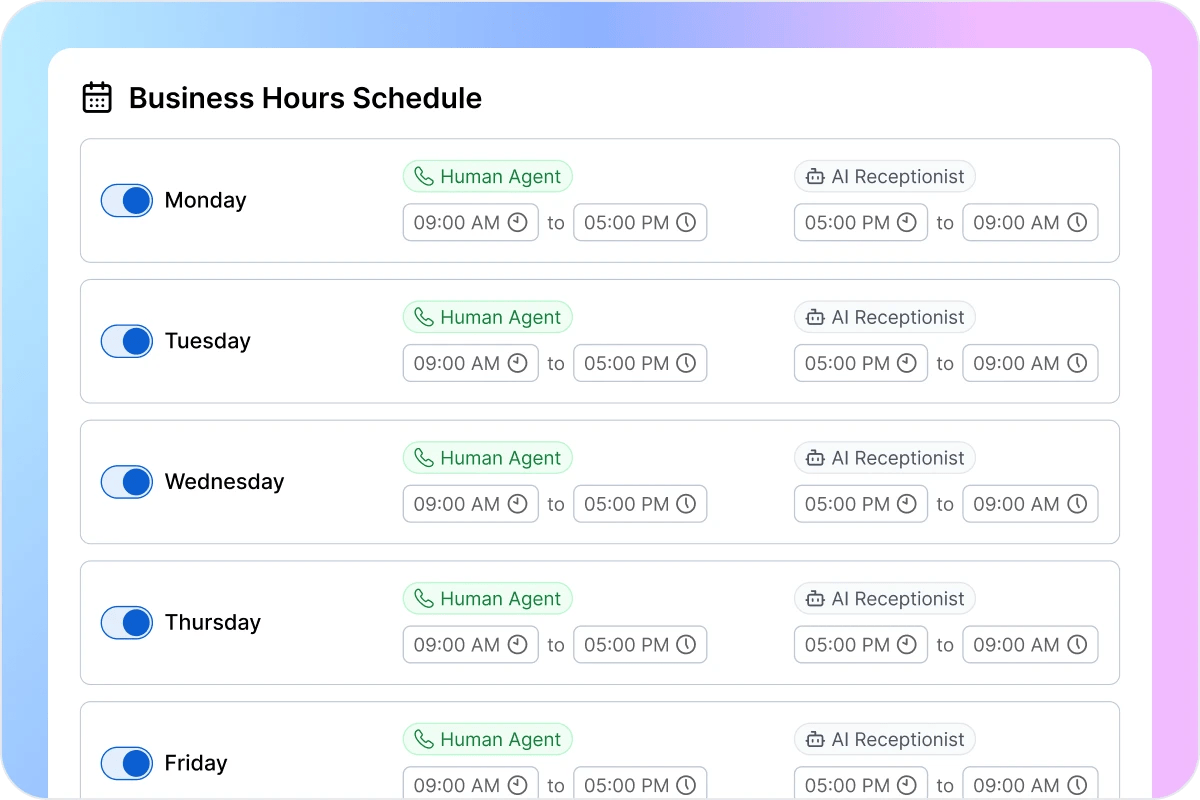
Set your business hours
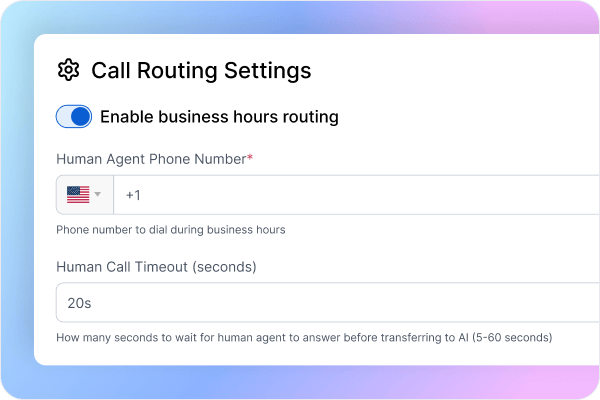
What if you could choose exactly when your team answers calls and when Welco takes over after hours, then never touch the settings again? Tell Welco when your receptionist is on duty, toggle each weekday on or off, set start and end times, and choose how many seconds the phone should ring before the AI steps in. During business hours, calls go to your team first. When the schedule ends or a day is switched off, every call routes straight to your AI receptionist automatically, with no manual forwarding or daily changes.
Configure after‑hours call flows
You control what Welco does with every after‑hours call. Ask it to record an intake message, collect project info, or drop bookings straight into free time slots. It can reply to routine questions using the information you’ve already added. When something sounds urgent, Welco flags it and routes the call to a real person. All other calls stay with the AI, so customers still feel heard and helped even when your office is closed.
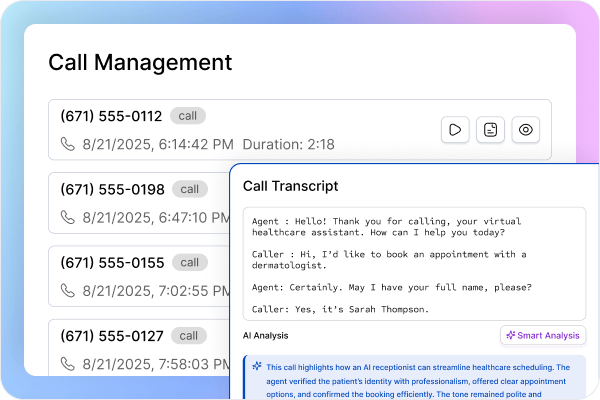
Track every AI‑handled call
Each morning, Welco’s call management view gives you a clear replay of your after‑hours activity. For every call, you can hit play to hear the conversation, scan the transcript, and review Welco’s smart summary of the key points. Intake form logs sit right beside the call details, making it easy to see the information you captured and decide which leads to follow up on first. You get the full context of every call without scrubbing through voicemails or chasing half‑written notes.
After‑hours Calls: Where Welco Quietly Pays for Itself

No More Lost Leads
Set Welco as your after‑hours AI receptionist and every caller gets real help, not voicemail. It books open slots, collects intake details, answers FAQs, and sends confirmations. Calls are recorded, transcribed, and analyzed with AI so you quickly see key points and keep late‑night leads with you.

Reduce After-Hours Stress
Your staff can truly clock out, knowing Welco is still answering questions, logging calls, and summarizing everything for the morning. Instead of coming into a pile of unknown voicemails, they get clear call summaries, transcripts, and intake forms that show exactly who to follow up with first.

Earn More From After-Hours Calls
Night and weekend calls are often your highest‑value ones: urgent questions, last‑minute bookings, schedule changes, new client inquiries, and time‑sensitive quote requests. Welco captures these requests in real time, escalates true emergencies to an on‑call human, and locks in next‑day work before the customer tries anyone else, turning what used to be “missed calls” into your most profitable jobs.
What Businesses Say About After-Hours Calls
“Welco now answers every after‑hours call from homeowners asking about timelines, pricing, or what we handle. It collects all the project details for us and only routes true emergencies to whoever is on call. When I sit down in the morning, I can open call management and see every summary, the full transcript, the audio, and the intake form in one place, so I know exactly which jobs to jump on first.”

Tom Harris
General Contractor, Denver
“As a real estate agent, most of my calls come after clients finish work. Welco picks up every time, answers the usual questions about listings, showings, and paperwork, and logs all the caller details for me. If something is truly urgent, it transfers the call to my cell. Then I get a text and email with a short AI summary and transcript link, so I never miss a serious buyer or seller.”

Maria Santos
The Harbor Grill
“For landscaping, people call with lots of questions and half‑formed project ideas. Welco handles those after‑hours calls, walks them through basic FAQs, and gathers things like property size, budget, and preferred dates. It only escalates real rush jobs to a human. Every call lands in my inbox with a smart AI summary and transcript, which makes it incredibly easy to sort leads and plan crews for the week.”

James Miller
Operations Manager GreenScape Landscaping
Welco Integrates Seamlessly with Your Business Tools
Connect Welco with your calendar, CRM, and business apps. After-hours appointments sync automatically, call details log to your system, and your team sees complete context for morning follow-ups.
Industries That Need an After-Hours AI Receptionist

Real estate agencies
Buyers and sellers call in the evenings to ask about listings, schedule showings, and check on offers. Welco answers those questions, collects property preferences and contact details, books viewings into your calendar, and only routes urgent negotiation calls to your phone. In the morning, you see a clean list of leads with summaries and transcripts instead of vague missed‑call notifications.

General contractors
Homeowners call after work about quotes, timelines, and what services you provide. Welco walks them through common FAQs, gathers project information like location, budget, and preferred dates, and books estimate slots automatically. If someone reports a serious issue, it flags the call and passes it to your on‑call person, while still logging a full transcript and summary so nothing slips through the cracks.

Landscaping and outdoor services
Most landscaping questions come in at night or on weekends when people are looking at their yards. Welco captures all the intake details, from property size to project goals, answers standard pricing and availability questions, and fills your calendar with site visits. Each call is recorded, transcribed, and summarized so you can quickly review the best opportunities and plan crews without digging through voicemails.

Professional services and local businesses
From accounting firms and law practices to salons and home services, clients call outside office hours to check availability, pricing, and next steps. Welco handles these calls, uses your knowledge base to answer routine questions, logs intake forms, and sends confirmations by SMS or email. By the time your team signs on, they have call summaries, transcripts, and clear follow‑ups instead of an overflowing inbox of missed calls.

Transportation and logistics
In towing, delivery, or courier work, after‑hours calls often involve urgent, time‑sensitive jobs. Welco takes location details, assesses urgency using your rules, and queues or escalates jobs to the right on‑call contact. Every conversation is stored with audio, transcript, and AI summary so dispatchers can see exactly what was promised and keep operations moving smoothly.

Healthcare & wellness clinics
Patients and clints often call after hours to ask about appointment availability, rescheduling, basic pricing, or preparation instructions for visits. Welco can answer standard FAQs from your policies, collect intake details like reason for visit and contact info, and book or reschedule time slots within your calendar. When something sounds truly urgent, it escalates to the on‑call line, while still logging recordings, transcripts, and AI summaries so staff can review every interaction the next day.
Your After-Hours Calls Are Going to Someone… Make Sure It’s Your AI Receptionist
Voicemail won’t save you. Welco’s AI receptionist answers every after-hours call the moment your team signs off, so you win jobs competitors never even see.
Frequently Asked Questions About After-Hours Call Handling
How long does it take to set up Welco for my business?
Most teams get Welco live in about 15–20 minutes. You add your business details, set your hours, and turn on call forwarding, and Welco can immediately answer FAQs, collect intake details, and route or transfer calls. If you want fully customized workflows, those can take a bit longer, and Welco’s team is available to help you design and set them up for your business.
